Android Development - Part 2
IDE: integrated development environment- it helps your while your coding
- give you feed backs
- it is fast because of the auto complete mechanism
- better to troubleshoot because of debugging feature
- i can change class name in all of my program easily, don’t need to search for each file
- there are three ways to test your app
- first your can use emulator : has problems
- second use a physical device : better but have to test on specific number of device, depending on what you own
- use genymotion : best way
- Java code components
- File
- class
- attribute
- methods
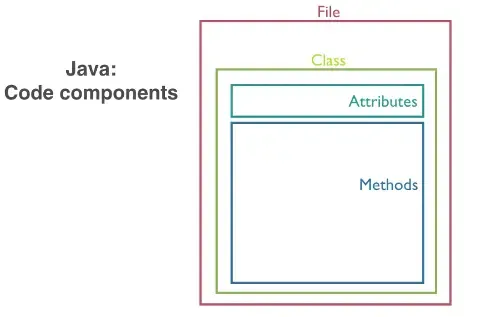
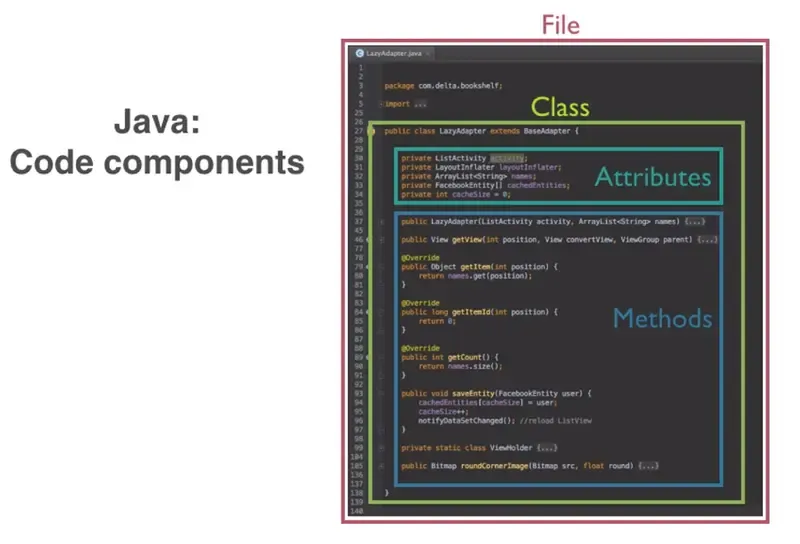
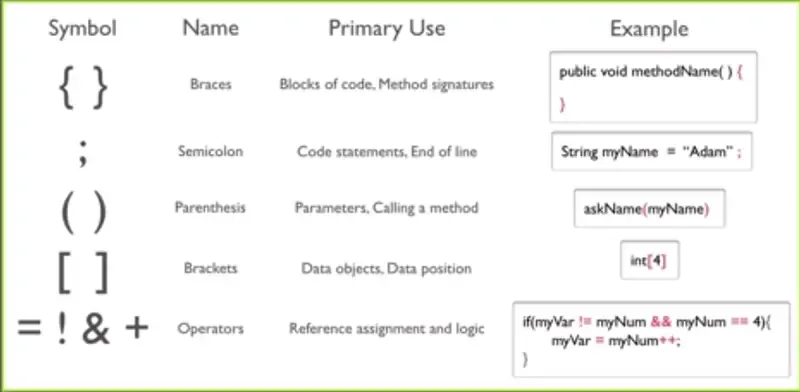
- case of the writing : how you write variables or methods or any name
camelCase: small first wordcameland capital the second oneCasePacalCase: capital each word
- there are five components for the java method signature
- accessibility keyword, this defines what has access to this method
- the return value type, even if there is no return value
- method name, so we can call it
- syntax symbols like parenthesis or braces
- parameters, these are the inputs to the method
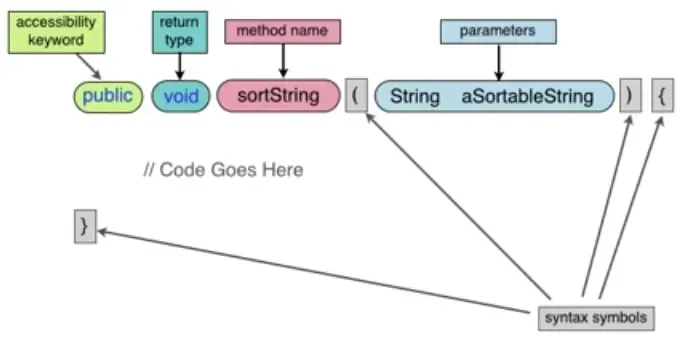
- attribute is in the beginning of the class
- how to differentiate between class and method
- the class’s name followed by braces {}, it’s better to use PascalCase to define it
- the method’s name followed by parenthesis (), it’s better to use camelCase to define it
- example of class, a private method and variables
// class definition
public class MyInfo
{
  // attributes
  int myAge = 33;
  String myName = "Ahmed";
  boolean isMale = true;
  char middleInitial = 'M';
  float myHeightInMeters = 1.6f;
  // method definition
  private void updateMyInfo ()
  {
    myAge = 35;
    myName = "Ahmed Khairy";
  }
}
- memory
- reading, writing
- pointers, that used when one location is not sufficient, so it give it the beginning of the memory that can be used
- if we use pointer it won’t be known where is the end of that variable until we put
\nthat’s mean the end of that variable, the benefit of pointer that i can use data without copying it 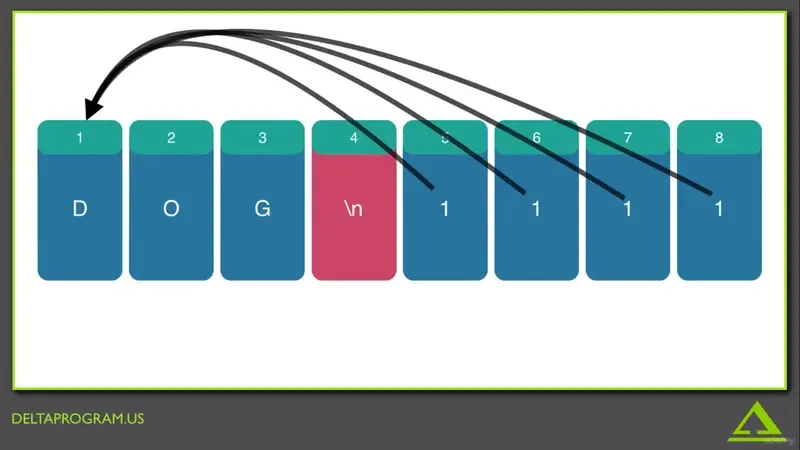
- there are two different data types
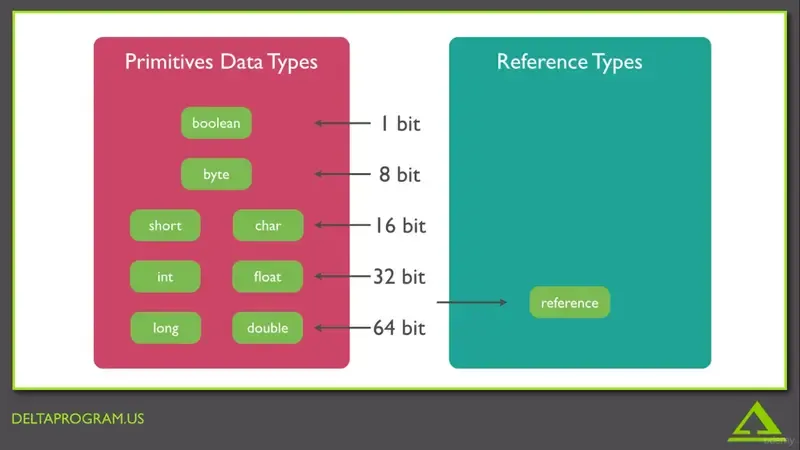
- it is better to reduce the usable memory as possible
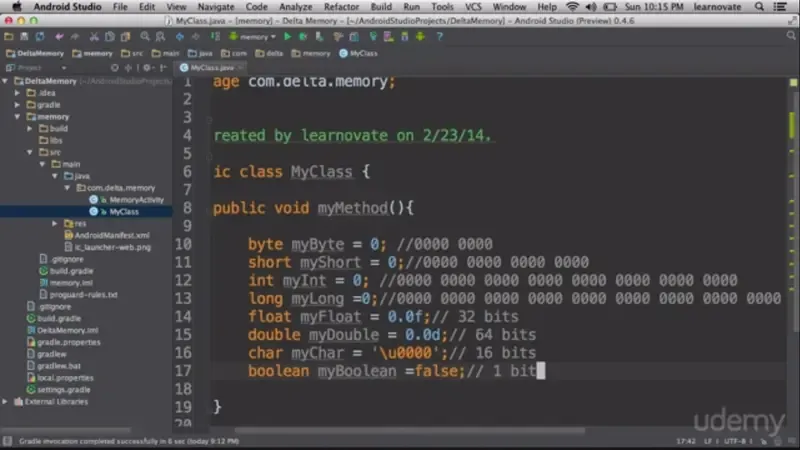
- references are pointers
- to define a reference you use :
int[] new = new int [4];- this code means that this is an int array called new and it reserves 4 places in memory each place is int data type
- to assign value to each place :
new [0]= 2;, and so one tonew [3] - if i want to make reference but not giving it a memory we use :
int [] new;, this declaration make the reference equalnull - so for example if i create another reference :
int[] new2;it’s value will benull - i can make the new reference points to the value of the first reference by writing :
new2 = new;, but if i assign anulltonewreference, thenew2still point to the same data
- installing android studio
- sdk manager installing
- if i want to declare one
intvariable i can useint x, but if i want to declare array ofintvariables i can useint [] - i can set array elements by
int [] myArray = new int [5];
myArray [0] =  0;
myArray [1] = 4;
etc ...
int [] myArray = {0,4,etc,...}; //the size of the array is defined depending on the elements
- list types
- arraylist
- linkedlist
- vector
- difference between array and list
String[] days = {"sat","sun","mon","tue","wed","thur","fri"}: array- if i want to insert an element between them i have to create new array then take the elements before the inserted element then add the new element and take the other elements from the original array and so on
ArrayList<String> myList = new ArrayList<String>();: define a collection in java- if i want to add elements to that list i will use
myList.add("first"); myList.add("second"); myList.add("fourth"); - if i want to insert an element between them i will just use the index number and use add
myList.add(2,"third");
- if i want to add elements to that list i will use
- it is used to store data that is unique and never duplicate
- types of Sets
- hashset
- treeset
- linkedhashset
- if i want to store data like
HashSet<String> mySet = new HashSet<String>();
mySet.add("one");
mySet.add("two");
mySet.add("three");
mySet.add("two"); // this won't be added, it will keep just one of them
- it is used to give a key to an element instead of index number like
key >>>> value 0 >>>> "cat" 1 >>>> "dog" 200 >>>> "anything" - types of maps
- hashmap
- hashtable
- treemap
- to declare a map
HashMap<String,String> myhashmap = new HashMap<String, String>(); myhashmap.put("mykey","dog"); //to put elements myhashmap.get("mykey"); //to get it - to make a list of key maps
HashMap<String,HashMap<String,String>> newhashmap = new HashMap<String,HashMap<String,String>>();
newhashmap.put("USA",newhashmap);
- java is an object oriented programming
- differences between class and Object
public class MyClass //this is class (blue print) { String variable = "moose"; public MyClass (String aString) { variable = aString; } } - to get from a class to an object, we use the
newkeywordMyClass myObject = new MyClass();- this will point to MyClass memory, it takes it’s blue print
- if i use this command
MyClass otherObject- this will point to
null
- if i create an array of objects the inheret from
MyClassMyClass[] someObjects = new MyClassp[5];- all of them will point to null, i have to assign to each object like
someObjects[0]= myObject
-
MyClass myObject = new Myclass();MyClass: is the class i want to make object frommyObject: name of the new objectnew: keyword
-
but why is there a parenthesis?
- we use parenthesis when we deal with methods, but how ?
public class MyClass { String memberVariable = "moose"; public MyClass() { } public MyClass (String aString) { memberVariable = aString; } }- first and second methods are called constructors, because they are called when constructing the object for the first time
- even if we didn’t create them, they will be generated for us
- it is used to un allocate memories locations to free up spaces
- java keep track of memory spaces and count how many times the program points to that location