Android Development - Part 3
Android Studio Tutorial for Beginners (Step by Step tutorial)
Section titled “Android Studio Tutorial for Beginners (Step by Step tutorial)”Android Tutorial for Beginners 5 - Android Activity Lifecycle
Section titled “Android Tutorial for Beginners 5 - Android Activity Lifecycle”- inheret
- activity lifecycle
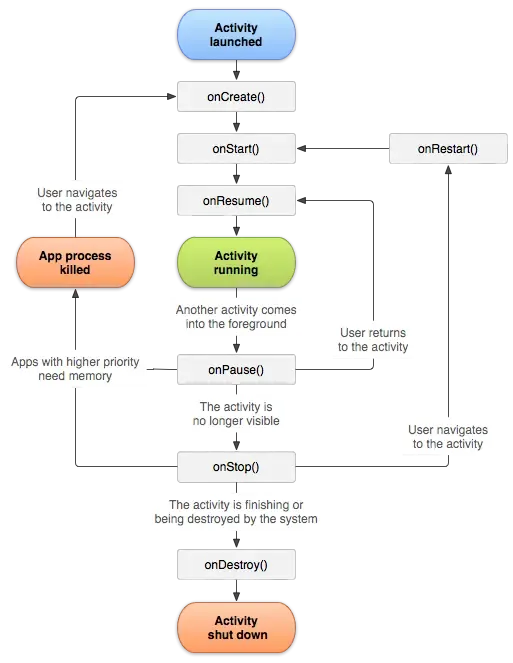
onCreate(): Called when the activity is first created. This is where you should do all of your normal static set up: create views, bind data to lists, etc. This method also provides you with a Bundle containing the activity’s previously frozen state, if there was one. Always followed by onStart().onRestart(): Called after your activity has been stopped, prior to it being started again. Always followed by onStart()onStart(): Called when the activity is becoming visible to the user. Followed by onResume() if the activity comes to the foreground, or onStop() if it becomes hidden.onResume(): Called when the activity will start interacting with the user. At this point your activity is at the top of its activity stack, with user input going to it. Always followed by onPause().onPause(): Called when the activity loses foreground state, is no longer focusable or before transition to stopped/hidden or destroyed state. The activity is still visible to user, so it’s recommended to keep it visually active and continue updating the UI. Implementations of this method must be very quick because the next activity will not be resumed until this method returns. Followed by either onResume() if the activity returns back to the front, or onStop() if it becomes invisible to the user.onStop(): Called when the activity is no longer visible to the user. This may happen either because a new activity is being started on top, an existing one is being brought in front of this one, or this one is being destroyed. This is typically used to stop animations and refreshing the UI, etc. Followed by either onRestart() if this activity is coming back to interact with the user, or onDestroy() if this activity is going away.onDestroy(): The final call you receive before your activity is destroyed. This can happen either because the activity is finishing (someone called Activity#finish on it), or because the system is temporarily destroying this instance of the activity to save space. You can distinguish between these two scenarios with the Activity#isFinishing method.
Android Tutorial for Beginners 7 # Adding Two Numbers App (Simple Calculator)
Section titled “Android Tutorial for Beginners 7 # Adding Two Numbers App (Simple Calculator)”Android Tutorial for Beginners 8 # wrap_content, fill_parent, Password Field and Toast in Android
Section titled “Android Tutorial for Beginners 8 # wrap_content, fill_parent, Password Field and Toast in Android”Android Tutorial for Beginners 9 # Android Checkbox Basics and Example
Section titled “Android Tutorial for Beginners 9 # Android Checkbox Basics and Example”- NEXT